In today’s digital world, communication happens instantly. Whether you’re chatting with friends, receiving appointment reminders, getting banking alerts, or confirming online purchases, you’ve probably interacted with SMS countless times. But what exactly does SMS meaning in text refer to, and why is it still so important despite the rise of messaging apps?
SMS, short for Short Message Service, is one of the most widely used communication technologies in history. Even with apps like WhatsApp, Messenger, Telegram, and Signal dominating conversations, SMS remains a vital part of personal and business communication worldwide.
In this comprehensive guide, you’ll learn the exact SMS meaning in text, its history, how it works, common uses, differences from other messaging services, advantages, disadvantages, and frequently asked questions.
What Does SMS Mean in Text?
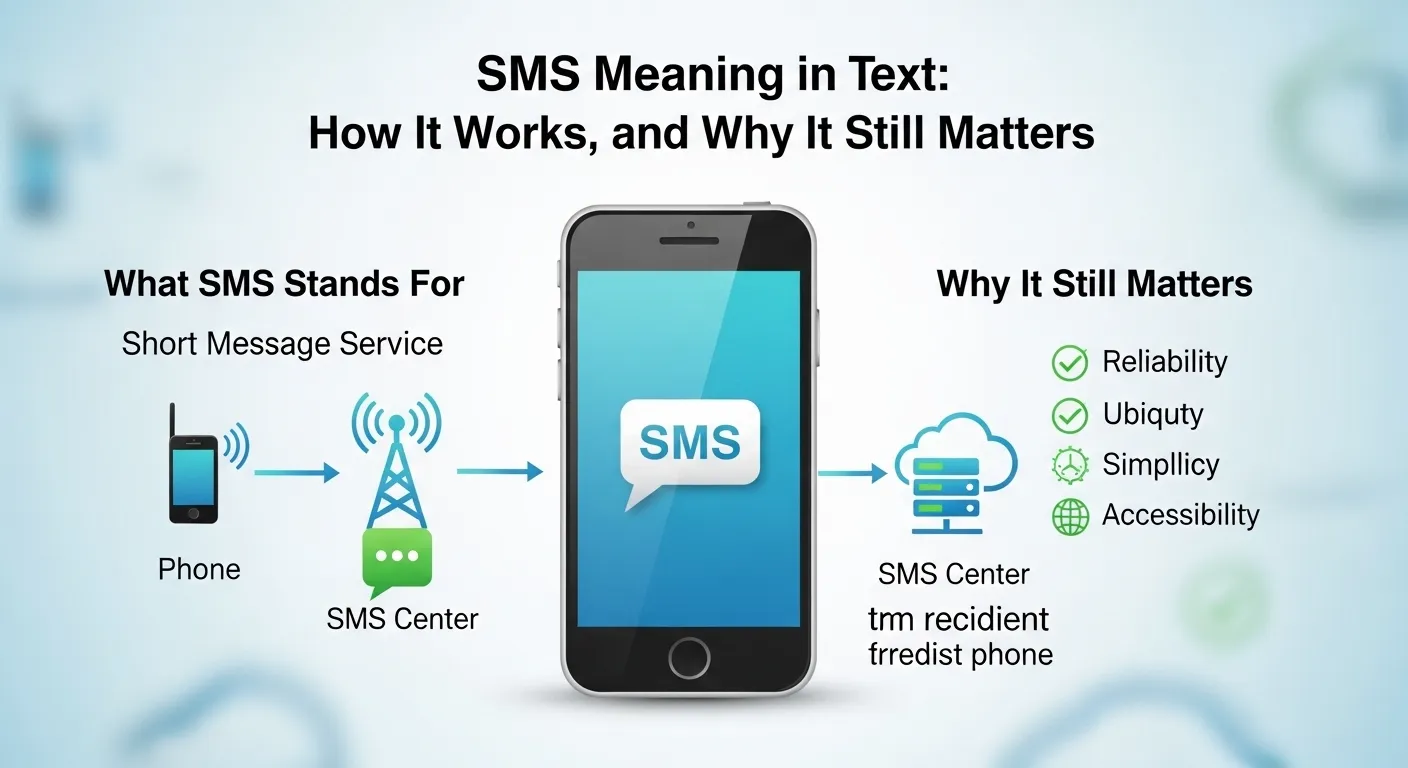
SMS stands for Short Message Service.
It is a text messaging service that allows users to send and receive short text messages between mobile devices.
When someone says “send me an SMS” or “I received an SMS,” they simply mean a text message sent through a cellular network rather than an internet-based messaging app.
Simple Definition
SMS = A standard text message sent through a mobile carrier’s network.
Example:
- “I’ll send you the address via SMS.”
- “Did you get my SMS?”
- “The verification code was sent by SMS.”
In everyday conversations, people often use the terms SMS and text message interchangeably.
SMS Meaning in Texting and Online Communication
In texting culture, SMS refers to traditional mobile text messaging.
For example:
| Term | Meaning |
|---|---|
| SMS | Short Message Service |
| Text Message | Message sent via SMS |
| SMS Text | Traditional phone text |
| SMS Notification | Alert delivered through text messaging |
| SMS Verification | Security code sent via text |
When businesses mention:
- SMS marketing
- SMS alerts
- SMS notifications
- SMS authentication
They are referring to messages delivered directly to a user’s phone number through cellular networks.
The History of SMS
SMS may seem ordinary today, but it was once a revolutionary technology.
Key Milestones
1984
- The concept of SMS was first proposed.
1992
- The first SMS message was sent.
The historic message was:
“Merry Christmas”
1993–1999
- Mobile phones gradually adopted SMS capabilities.
2000s
- SMS became one of the most popular forms of communication worldwide.
2010s
- Messaging apps began competing with SMS.
Today
- SMS remains essential for authentication, alerts, customer communication, and personal messaging.
Despite newer technologies, SMS continues to play a crucial role because it works on nearly every mobile phone.
How Does SMS Work?
Many people use SMS daily without understanding the technology behind it.
Here’s a simplified explanation:
Step 1: You Type a Message
You write a message on your phone.
Example:
“See you at 7 PM.”
Step 2: Message Travels Through Carrier Network
Instead of using internet data, the message travels through your mobile carrier’s network.
Step 3: SMS Center Processes It
The message passes through an SMS Center (SMSC), which manages delivery.
Step 4: Recipient Receives Message
The recipient’s mobile carrier delivers the message to their device.
The process usually takes only a few seconds.
Why Is SMS Still Popular?
With so many messaging apps available, many people wonder why SMS remains relevant.
Several reasons explain its staying power.
1. No Internet Required
Unlike WhatsApp or Messenger, SMS works without Wi-Fi or mobile data.
As long as cellular service exists, SMS can be delivered.
2. Universal Compatibility
SMS works on:
- Smartphones
- Basic mobile phones
- Android devices
- iPhones
- Feature phones
No special app is needed.
3. High Open Rates
Research consistently shows that SMS messages are opened far more frequently than emails.
Most people read text messages within minutes.
4. Reliability
Businesses trust SMS because it is fast and dependable.
Common Uses of SMS Today
SMS serves many purposes beyond personal communication.
Personal Messaging
People use SMS for:
- Conversations
- Greetings
- Quick updates
- Family communication
Example:
“Running late. Be there in 10 minutes.”
Security Verification
Many companies send:
- One-time passwords (OTPs)
- Verification codes
- Login confirmations
Example:
“Your verification code is 834512.”
Appointment Reminders
Doctors, dentists, and service providers often send reminders.
Example:
“Reminder: Your appointment is tomorrow at 2 PM.”
Banking Alerts
Banks frequently use SMS to notify customers about:
- Transactions
- Account activity
- Fraud alerts
Delivery Notifications
Shipping companies use SMS to provide:
- Tracking updates
- Delivery confirmations
- Arrival notices
SMS vs MMS: What’s the Difference?
Many people confuse SMS and MMS.
Here’s a comparison:
| Feature | SMS | MMS |
|---|---|---|
| Full Name | Short Message Service | Multimedia Messaging Service |
| Text Messages | Yes | Yes |
| Images | No | Yes |
| Videos | No | Yes |
| Audio Files | No | Yes |
| Internet Required | No | Sometimes |
| Cost | Usually Lower | Usually Higher |
Example of SMS
“Happy Birthday!”
Example of MMS
A birthday message that includes:
- Photos
- GIFs
- Videos
SMS vs Instant Messaging Apps
Modern messaging apps differ significantly from SMS.
| Feature | SMS | |
|---|---|---|
| Internet Required | No | Yes |
| Uses Phone Number | Yes | Yes |
| Works on Basic Phones | Yes | No |
| End-to-End Encryption | Usually No | Yes |
| Group Chats | Limited | Extensive |
| Media Sharing | Limited | Advanced |
Popular messaging apps include:
- Telegram
- Signal
- Messenger
While apps offer more features, SMS remains more universally accessible.
Advantages of SMS
SMS offers several benefits.
Fast Delivery
Messages are typically delivered within seconds.
High Read Rates
Most recipients read SMS quickly.
No App Installation
Users don’t need:
- Downloads
- Updates
- Accounts
Broad Reach
SMS works across nearly all mobile devices.
Effective Business Tool
Companies use SMS for:
- Promotions
- Customer support
- Reminders
- Authentication
Disadvantages of SMS
Although useful, SMS has limitations.
Character Limits
Traditional SMS messages have a limit of:
160 characters per message
Longer texts may be split into multiple messages.
Limited Media Support
SMS primarily supports text only.
Potential Costs
Depending on carrier plans:
- Sending SMS may incur charges.
- International SMS may cost more.
Less Secure
Standard SMS is generally less secure than encrypted messaging apps.
What Is SMS Language?
SMS language refers to abbreviations and shortcuts people use when texting.
These shortcuts became popular when phones had limited keyboards.
Common SMS Abbreviations
| Abbreviation | Meaning |
|---|---|
| LOL | Laugh Out Loud |
| BRB | Be Right Back |
| OMG | Oh My God |
| BTW | By The Way |
| IDK | I Don’t Know |
| TTYL | Talk To You Later |
| IMO | In My Opinion |
| ASAP | As Soon As Possible |
Example
Instead of writing:
“I will talk to you later.”
Someone might text:
“TTYL”
SMS in Business Communication
Businesses increasingly rely on SMS.
SMS Marketing
Companies send promotional messages such as:
- Sales announcements
- Coupons
- Product launches
Example:
“Get 20% off today only!”
Customer Support
Businesses use SMS to:
- Answer questions
- Confirm bookings
- Provide updates
Transactional Messages
Examples include:
- Order confirmations
- Shipping updates
- Password reset codes
SMS Authentication and Security
One of the most important modern uses of SMS is security verification.
Two-Factor Authentication (2FA)
After entering a password, users receive a code via SMS.
Example:
- Enter password.
- Receive SMS code.
- Enter code.
- Access account.
This provides an additional layer of protection.
Benefits
- Easy to use
- Widely available
- Fast delivery
Limitations
Cybersecurity experts note that SMS-based authentication is not the most secure method available.
Whenever possible, security apps and authenticator applications may provide stronger protection.
Common Misunderstandings About SMS
Many misconceptions exist regarding SMS.
Myth 1: SMS Requires Internet
False
SMS uses cellular networks.
Myth 2: SMS Is Obsolete
False
Millions of SMS messages are sent every day.
Myth 3: Only Older Phones Use SMS
False
Modern smartphones still support SMS.
Myth 4: SMS and MMS Are the Same
False
SMS handles text, while MMS supports multimedia.
Related Terms You Should Know
Understanding related communication technologies can help clarify SMS.
MMS
Multimedia Messaging Service.
Supports:
- Images
- Videos
- Audio
RCS
Rich Communication Services.
Often described as the next generation of SMS.
Features include:
- Read receipts
- Typing indicators
- Better media sharing
OTP
One-Time Password.
Frequently delivered through SMS.
Push Notifications
Messages delivered through apps rather than cellular networks.
Real-Life Examples of SMS Usage
Example 1: Bank Alert
“Your debit card was used for a purchase of $45.”
Example 2: Delivery Update
“Your package will arrive today.”
Example 3: School Notification
“School will be closed tomorrow.”
Example 4: Verification Code
“Your code is 573921.”
Example 5: Personal Message
“Don’t forget dinner at 7 PM.”
These examples demonstrate how deeply integrated SMS is into everyday life.
The Future of SMS
While messaging apps continue to grow, SMS is unlikely to disappear anytime soon.
Reasons include:
- Universal accessibility
- Security verification needs
- Business communication
- Emergency notifications
New technologies such as RCS may gradually enhance traditional texting experiences, but SMS remains a foundational communication tool.
Experts expect SMS to continue supporting:
- Customer engagement
- Authentication systems
- Alerts and notifications
- Emergency communications
for many years to come.
Frequently Asked Questions (FAQs)
What does SMS mean in text?
SMS stands for Short Message Service, a technology that allows text messages to be sent between mobile phones through cellular networks.
Is SMS the same as a text message?
Yes. In everyday conversation, SMS and text message usually mean the same thing.
Does SMS require internet access?
No. SMS works through mobile carrier networks and does not require Wi-Fi or mobile data.
What is the SMS character limit?
A traditional SMS message is limited to 160 characters. Longer messages may be split into multiple segments.
Is SMS secure?
SMS offers basic security but is generally less secure than end-to-end encrypted messaging apps such as Signal or WhatsApp.
What is the difference between SMS and MMS?
SMS is for text-only messages, while MMS allows multimedia content such as photos, videos, and audio files.
Why do companies use SMS?
Businesses use SMS because it is reliable, has high open rates, and reaches customers quickly.
Conclusion
Understanding the SMS meaning in text is important because SMS remains one of the world’s most widely used communication methods. SMS (Short Message Service) enables users to send and receive text messages through mobile carrier networks without needing internet access. Despite the popularity of messaging apps, SMS continues to play a critical role in personal communication, business messaging, security verification, appointment reminders, banking alerts, and emergency notifications.
Key takeaways include:
- SMS stands for Short Message Service.
- It works through cellular networks rather than internet connections.
- SMS is different from MMS and modern messaging apps.
- Businesses and organizations heavily rely on SMS for communication.
- SMS remains relevant due to its simplicity, reliability, and universal compatibility.
Whether you’re sending a quick text to a friend or receiving an important verification code, SMS continues to be a trusted and essential part of modern digital communication.

I’m a language-focused blogger from the United States, and I write about modern texting habits and online expressions. My goal is to help readers stay up to date with constantly evolving digital slang by sharing accurate meanings, practical usage tips, and real conversational examples.